myMSOE Mobile Experience Redesign
Project Overview
In my Psychology of Design course, my team of four was tasked with creating a new digital product. We chose to redesign the mobile experience of the myMSOE platform after identifying usability issues that impacted how students accessed essential campus resources.
Through initial research and team discussions, we found that students frequently struggled to locate key information such as schedules, transcripts, financial details, and campus services. These tasks often required navigating multiple systems, leading to frustration and inefficiency, especially on mobile devices.
To better understand these challenges, we conducted user research with students and analyzed common usage patterns. A key insight emerged: students were not lacking access to information—they were struggling with fragmented systems and poor information architecture. Based on these findings, we shifted our approach to a mobile-first redesign, focusing on accessibility, efficiency, and reducing cognitive load. Throughout the process, we iterated on multiple design concepts, refining layouts and navigation structures to better align with how students prioritize and access information in real-world scenarios.
Project Goal
The primary goal of this project was to design a mobile interface that allows students to quickly access the most important campus tools in one centralized location.
To achieve this, we focused on:
Reducing the number of steps required to complete common tasks
Improving information architecture to support faster navigation
Designing an interface optimized for mobile usage and quick interactions
Creating a system that prioritizes high-frequency student needs
Personal Contributions
This project was a collaborative effort, and my primary responsibility was designing the interface mockups and interactive prototypes. I approached this work by applying UX and psychology-of-design principles to guide decision-making, rather than focusing solely on visual layout.
Research Translation & Information Architecture
Based on our user research, I helped translate key insights into a structured interface. One of the most important decisions was to organize the platform around task-based grouping, rather than mirroring existing system structures. This shift ensured that content aligned with how users think, rather than how systems are built.
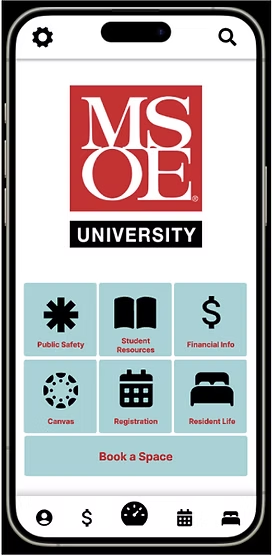
We identified six core categories (widgets) based on frequency of use and user priorities:
Student Resources (transcripts, schedules, account info)
Residence Life (campus activities, housing)
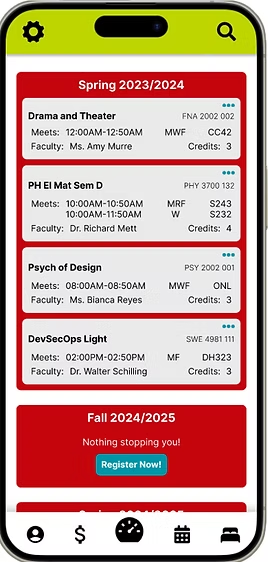
Registration (courses and enrollment)
Public Safety (emergency tools)
Financial Information (tuition, aid)
Quick Access (Canvas and space booking)
Interaction Design & Usability Decisions
While designing the interface in Adobe XD, I focused on reducing cognitive load and improving efficiency through specific UX decisions:
Chunking information into widgets to make content more scannable
Applying visual hierarchy to highlight high-priority actions
Designing for recognition over recall, allowing users to quickly identify tools without searching deeply
Minimizing navigation depth to reduce the number of interactions required
I also created interactive prototypes to test how users would move through the interface and complete tasks, ensuring that navigation felt intuitive and aligned with user expectations.
Iteration & Refinement
Early design iterations revealed that grouping too many features together created confusion. In response, I refined the layout by:
Simplifying category structures
Improving spacing and readability
Prioritizing the most frequently used actions at the top of the interface
These iterations helped create a more focused and usable experience.
Project Results
The final outcome was a mobile-first prototype of the myMSOE platform that centralizes essential student services into a single, easy-to-navigate interface.
More importantly, the design decisions made throughout the process led to clear usability improvements:
Task-based organization improved navigation efficiency, allowing users to find resources faster
Widget-based layout reduced cognitive overload, making the interface easier to scan
Prioritized content hierarchy improved usability, ensuring high-frequency actions were immediately accessible
Feedback from peers and users indicated that:
The platform felt more intuitive and easier to navigate than the existing system
Users appreciated having key resources centralized in one place
The interface reduced the frustration associated with switching between multiple systems
-
![]()
Iteration 1
-
![]()
Iteration 2
-
![]()
Final Iteration
-
![]()
Register Page
-
![]()
Success Message